
3.3 KiB
Chatterbox Voice Studio design
Goal
Add a local-network web interface at chatterbox.dimensionlab.net where any
LAN visitor can upload, list, select, delete, and use local reference clips to
generate Chatterbox speech.
Experience
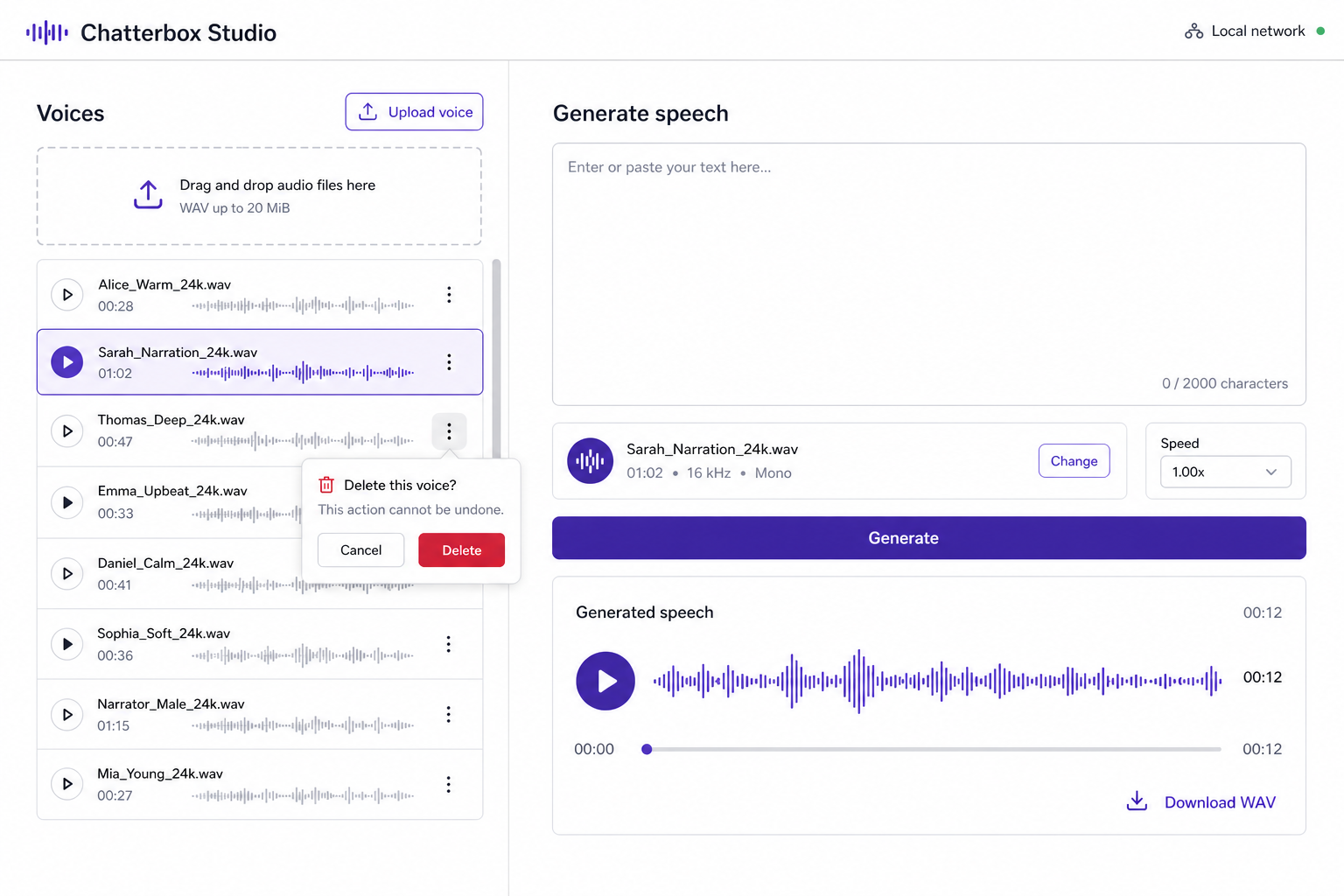
The root route (GET /) serves a single-page studio. It uses a calm white,
two-column desktop layout with a responsive stacked mobile layout:
- The left voice-library panel lists stored clips with filename, duration, format, and selection state. It provides an upload drop zone/button and an explicit delete action with an in-page confirmation.
- The right generation panel contains the selected-voice summary, text field, 2,000-character counter, speed input, Generate button, and generated-audio player with WAV download.
- Empty states tell visitors to upload a voice first. Generation, upload, and delete show clear inline progress, success, and error states.
No authentication is required: this is intentionally available to everyone on the local network. The service remains bound to loopback; DNS and Caddy define its local-network exposure.
Voice storage and API
Voice files continue to live exclusively under VOICES_DIR.
GET /v1/voicesreturns safe metadata for each managed file: relative name, byte size, duration, sample rate, and channel count. It preserves existing stored filenames rather than renaming them during listing.POST /v1/voicesaccepts a multipartfileupload. The server sanitizes the filename for storage and display, rejects any path-like name (including encoded traversal) and collisions, accepts WAV only in this first release, validates that the decoded audio is nonempty, and saves insideVOICES_DIRonly.DELETE /v1/voices/{name}deletes one validated, regular file belowVOICES_DIR; it rejects traversal, absolute paths, symlink escapes, and missing files.POST /v1/audio/speechkeeps its current OpenAI-compatible contract. The studio submits the selected relative filename asvoiceand renders the returned WAV locally in the browser.
The existing model lock continues to serialize synthesis. Voice-management operations do not load the model. Deleting a clip does not interrupt an active synthesis request because speech validates and resolves its reference path before handing it to the model manager.
Error handling and safety
All API failures are JSON with a clear 4xx/5xx detail. The UI renders these as
inline messages. Deletion requires a confirmation click but no login. Uploads
are WAV only and capped at 20 MiB. Uploaded audio is never committed to Git;
the existing voices/* ignore rule remains in place.
Rollout order
- Implement the voice-management API and its path-safety, validation, and deletion tests.
- Update the speech endpoint only as needed to consume the stored relative filename selected by the UI, retaining its OpenAI-compatible response.
- Add the two-column studio and wire it to the tested API.
Verification
Automated tests cover list metadata, WAV-only and 20 MiB upload validation, filename/path containment, duplicate rejection, deletion behavior, and the existing speech contract. Browser QA covers upload, selection, deletion confirmation, speech generation/playback/download, desktop layout, and the responsive stacked mobile layout.